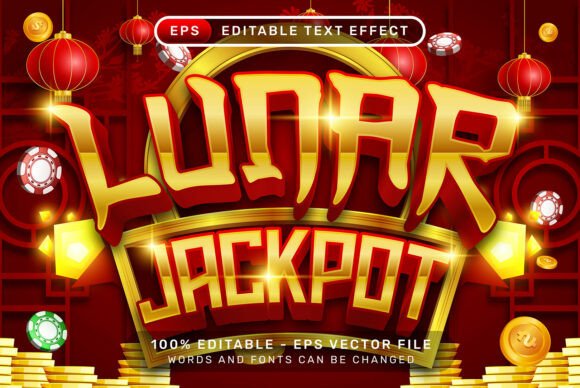
Instant Festive Impact: The Lunar Jackpot 3D Text Effect
Every designer knows the struggle of trying to capture a specific cultural aesthetic without spending hours manually tracing paths or searching for obscure textures. You want that vibrant, celebratory look—think Chinese New Year campaigns or Mid-Autumn Festival promotions—but achieving that depth and authenticity in Adobe Illustrator usually requires advanced 3D skills or expensive plugins. This is where the Lunar Jackpot 3D Text Effect steps in, offering a shortcut to a high-impact visual style. It bridges the gap between standard flat typography and complex 3D rendering, providing an editable vector solution that integrates seamlessly into your workflow.
More Than Just a Font: Understanding the Visual Appeal
At first glance, you might categorize this simply as a display typeface, but it is actually a comprehensive Adobe Illustrator 3D text effects EPS file. What makes it visually distinct is the integration of cultural motifs directly into the letterform construction. You aren't just getting text; you are getting typography adorned with intricate lanterns and Chinese ornaments. This turns a standard headline into a piece of illustration. For designers, this is a massive time-saver. Instead of manually kerning text and then layering decorative elements on top, the Lunar Jackpot 3d Text Effect provides a cohesive aesthetic out of the box. It evokes a sense of luck, prosperity, and celebration, making it a powerful tool for visual storytelling.
The "3D" aspect is particularly noteworthy. In modern design, flat design is popular, but there are times when you need depth to grab attention. This effect uses lighting and perspective to make the text pop off the canvas. It’s not a raster image that becomes pixelated when enlarged; it is a vector, meaning you can scale it for a massive billboard or shrink it for a business card without losing quality. This scalability is essential for brand identity work where assets need to live across multiple mediums.
Practical Applications for Creative Professionals
You don't need to be working on a specific holiday project to use this asset. The versatility of an editable text effect with lanterns and Chinese ornaments extends far beyond seasonal marketing. Here is how you can leverage this asset in your day-to-day work:
- Branding and Logo Design: If you are working with a client in the hospitality, food, or entertainment industry—specifically those focusing on Asian cuisine or cultural experiences—this effect can serve as a primary logomark or a secondary brand element. It instantly communicates the nature of the business through visual cues.
- Packaging Design: For products like tea, snacks, or specialty goods, packaging needs to stand out on a crowded shelf. Using the Lunar Jackpot 3d Text Effect on the product name can create a premium, artisanal look. Because it is a vector .EPS file, you can easily integrate it into your dielines and packaging mockups.
- Social Media and Content Creation: In the fast-paced world of social media, stopping the scroll is everything. A static, flat post often gets ignored. However, a bold, textured 3D text effect creates visual interest. Use it for YouTube thumbnails, Instagram sale announcements, or Facebook cover photos to drive higher engagement rates.
- Event Invitations and Editorial Layouts: From wedding invitations to gala dinner menus, the ornamental nature of this text effect adds a layer of elegance. It pairs well with high-end editorial design, such as magazine headers for travel or culture sections.
Seamless Workflow Integration
One of the biggest pain points with third-party design assets is compatibility. You buy a file, and it requires a specific version of software, or it relies on actions that you don't have installed. The Lunar Jackpot 3d Text Effect solves this by requiring no additional textures, no actions, and no plugins. Everything is contained within the file structure.
The user experience is designed for efficiency. If you are working in Adobe Illustrator, you simply select your text and apply the style. If you prefer using the Graphic Styles panel, you can load the library and apply the effect with a single click. This is a game-changer for small business owners or hobbyists who may not have deep technical knowledge of Illustrator’s 3D tools. You get a professional result without the learning curve.
Furthermore, because the text is fully editable, you aren't locked into a specific phrase. You can type whatever headline you need, change the font to a different serif or sans serif font to see how the ornaments react, and adjust the colors to match your specific brand identity. This flexibility ensures that the asset remains useful for years, rather than being a one-time-use graphic.
Enhancing Brand Recognition and Engagement
Typography plays a silent but massive role in how an audience perceives a brand. When you use a standard system font, you blend in with the noise. When you use a specialized display font like the Lunar Jackpot 3d Text Effect, you create a distinct visual signature.
Consistency is key in marketing. By using this specific creative font style across your digital and print materials, you create a cohesive look that audiences begin to recognize subconsciously. This recognition builds trust. For example, if a user sees a vibrant, textured header on your website, and then sees the same style in your email newsletter, the visual continuity reinforces your professionalism.
Readability is also a major factor. While decorative fonts can sometimes be hard to read, the 3D depth and high contrast of this effect actually aid in legibility, provided you use it for headlines and titles rather than body copy. It draws the eye to the most important information first, guiding the user’s journey through your layout.
Strategic Design Advice
To get the most out of this asset, consider these practical tips for your next project:
- Focus on Font Pairing: Because the Lunar Jackpot style is ornate and bold, it needs a partner that complements rather than competes. Pair it with a clean, geometric sans serif font for your body text. This contrast allows the headline to shine while keeping the supporting text easy to read.
- Test Your Backgrounds: While the file includes a high-resolution .jpg preview, the vector nature means you can place it over various backgrounds. Test it against solid colors, gradients, and even subtle textures. Ensure the background doesn't clash with the ornamental details of the text.
- Color Customization: Don't feel obligated to stick to traditional red and gold. While those colors work for specific cultural contexts, the vector paths allow you to recolor the text to match corporate blues, luxury blacks, or vibrant neons for a more modern, eclectic look.
- Commercial Licensing: Always double-check the licensing agreement of any premium font or design asset. Ensure that your intended use—whether for a client project or merchandise—falls within the permitted terms. This protects you legally and ensures you are respecting the creator's work.
Ultimately, the goal of any design asset is to solve a problem. The Lunar Jackpot 3D Text Effect solves the problem of creating complex, culturally rich, and professional typography without the hours of manual labor. Whether you are a marketing professional launching a campaign or a creative entrepreneur building a brand, having high-quality, easy-to-use assets in your toolkit is what separates good design from great design. It allows you to focus on the strategy and the message, knowing the visuals are handled.